EditCNC - CNC editor with DNC software
 

Calculator: Speeds, feeds, tapping drills, etc.


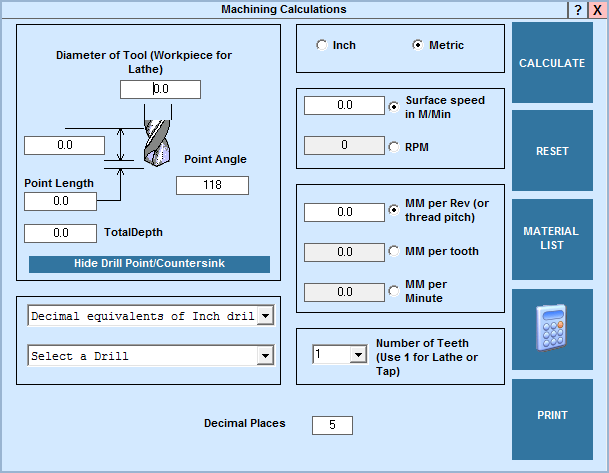
This application will enable the user to quickly calculate speeds and feeds for drills, milling cutters, and lathe workpieces.

Use this application to quickly look up the size in inches (or mm) of a Letter or Number drill, or the decimal equivalent of a fractional drill size, as well as tapping drills.

You may type the size of the drill directly into the “Diameter of Tool” field (you can use decimal or common fractions in this space). Alternatively, click the down arrow and use the drill charts to find the size needed. Click on the line to enter it into the diameter window. Choosing a metric tapping drill will change the calculations to “Metric”. If you wish, you can click the “Inch” option to convert the values to inches.

This application opens ready to use the Inch measuring system. To make metric calculations, click the “Metric” option button. You may also use the “Inch” and “Metric” options to convert values shown between Inch and Metric measurements. To work in millimeters and metres/minute, click the "Metric" button before starting.


Site Map
 ©Copyright CNC Consulting 1996-2009
Minimum system requirements for our software:
Any computer with Windows95 v950B or higher(32 bit), 98, ME, 2000 XP, NT, Vista.
Hardware requirements will depend on the size of CNC files processed with EditCNC and ConnectCNC.
However, ConnectCNC requires at least one serial COM port, or USB/RS232c port converter.